Royal Mughal Palace – Regal Bridal Portrait
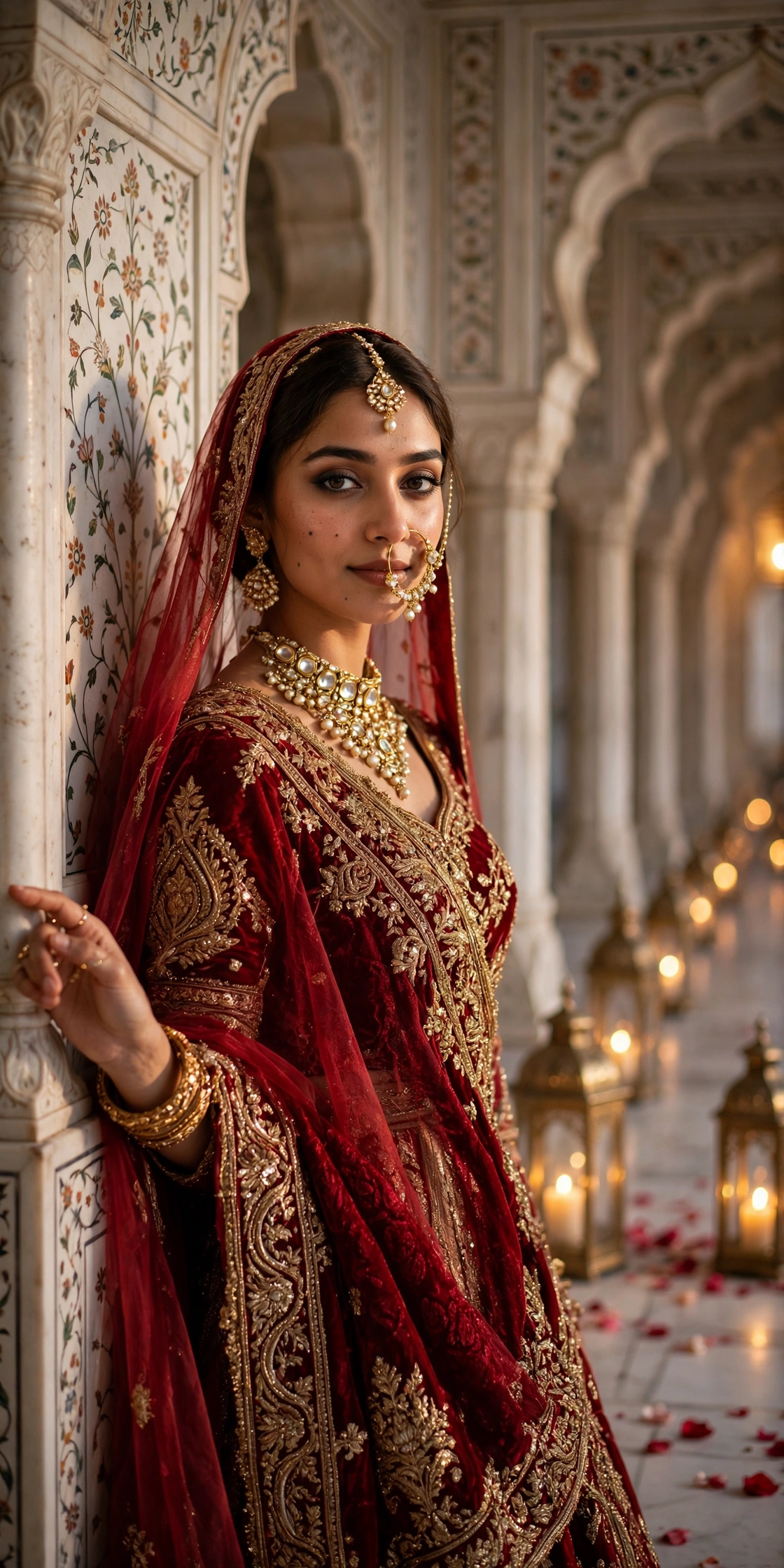
Every bride deserves a portrait that feels royal. This prompt takes your photo and places you inside a grand Mughal palace — white marble arches, glowing brass lanterns, rose petals on the floor — dressed in a deep red bridal lehenga with gold jewellery. It is perfect for wedding season: save-the-date posts, bridal shower invites, or a stunning profile picture during shaadi season. The prompt keeps your face exactly as it is and builds the royal setting around you, so it looks like a luxury wedding shoot. It suits brides-to-be, of course, but anyone who loves the regal desi aesthetic will enjoy this one. There is a groom version hiding in the tips below. For a festive couple look in the same royal mood, see the Eid night lanterns portrait.
🖼️ Example Result
📋 Copy the Prompt
Use the uploaded photo as the strict identity reference. Keep the face, facial features, skin tone and expression exactly the same — do not alter identity in any way.

Create an ultra-realistic regal bridal portrait (4:5) of the woman standing gracefully inside a grand Mughal palace corridor. She wears a deep red velvet bridal lehenga with heavy gold zardozi embroidery, a sheer red dupatta draped over her head, a gold kundan necklace, a large nath (nose ring) and a maang tikka. One hand gently rests on a carved marble pillar, eyes looking softly towards the camera.

Background: white marble arches with intricate floral inlay work, rows of glowing brass lanterns, soft rose petals scattered on the floor, warm golden depth.

Lighting: warm candlelight glow from the side, soft fill light on the face, subtle sparkle on the jewellery.

Camera: 85mm lens, f/2.0, shallow depth of field, elegant eye-level framing.

Style: luxury wedding photography, rich reds and golds, fine detail on fabric embroidery, natural skin texture, 4K. No text, no watermark.
🛠️ How to Use This Prompt
Using this prompt takes about two minutes. Copy it from the box above, open your AI app, upload your photo, and send. Here is the detailed walkthrough for both apps.
On Google Gemini:
- Go to gemini.google.com or open the Gemini app and sign in with your Google account.
- Tap the + button and upload a clear, front-facing photo of yourself. Pick one where your hair is visible — the dupatta needs to drape naturally over your head. No sunglasses, no heavy filters.
- Paste the copied prompt into the chat box and hit send.
- Wait for the portrait to generate, then tap it to download the full-size image.
On ChatGPT:
- Open chat.openai.com or the ChatGPT app and sign in.
- Tap the + or paperclip button, upload your photo, paste the prompt, and send.
- ChatGPT handles this prompt well too, though Gemini tends to give slightly warmer tones.
Photo tips: Your input photo matters more than anything else. Use a sharp, front-facing photo in good light. Make sure your hair and shoulders are visible so the dupatta and jewellery sit naturally. A calm, soft expression matches the royal mood better than a big smile.
If the face changes or the result looks off: Try a sharper, straight-on photo first — that fixes most face issues. If the dupatta drapes strangely, add “dupatta draped naturally over the head” to the outfit line. If the jewellery looks heavy or odd, simplify it to “a gold necklace and small earrings” and regenerate.
How to iterate: Change one line at a time. Swap “deep red velvet” for “emerald green”, regenerate, and compare. Then try the full-body version. One change per generation shows you what each line does.
💡 Tips for Best Results
- Change “deep red velvet” to “emerald green” or “ivory white” for a different bridal look.
- For a groom version, replace the outfit with “an ivory sherwani with a gold turban (safa)”.
- Use a photo where your hair is visible so the dupatta drapes naturally.
- A calm, soft expression matches the royal mood better than a big smile.
- For a full-body shot, replace “4:5” with “9:16” and add “full-body shot” after the outfit description.
- If the jewellery looks heavy or off, simplify to “a gold necklace and small earrings” and regenerate.
✨ Why This Prompt Works
This prompt is built like a checklist: identity first, then outfit, then jewellery, then background, then lighting. That separation matters — it tells the AI exactly what to keep (your face) and what to invent (everything else), so the face stays untouched while the palace gets detailed. The 85mm lens at f/2.0 is the classic portrait combination: it flatters the face and melts the background into a soft blur. And warm candlelight against gold jewellery creates that rich, expensive glow that makes bridal photos look premium.
❓ FAQs
Does this prompt work in ChatGPT too?
Yes, it works well in ChatGPT image generation. Gemini tends to give slightly warmer tones.
Can I make it a full-body shot?
Yes — replace “4:5” with “9:16” and add “full-body shot” after the outfit description.
I am not a bride. Can I still use this?
Yes — there is a groom version in the tips above, and the palace setting works for any regal portrait.
The dupatta looks strange. Any fix?
Upload a photo where your hair and shoulders are visible, and add “dupatta draped naturally over the head” to the outfit line.
Can I change the lehenga colour?
Yes — swap “deep red velvet” for any colour, like “emerald green” or “blush pink”. The gold embroidery still works. Want drama of a different kind? The retro 90s film poster is pure fun.
Want more? 👉 Explore the latest trending AI prompts on the Faymasin homepage.